Posts

Showing posts with the label Raspberry Pi

Set up date and time on Debian OS
Image
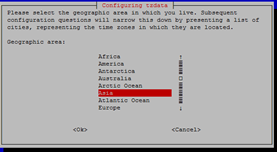
View information on local time, date, timezone,.. timedatectl Local time : Wed 2017 - 08 - 09 14 : 37 : 36 + 07 Universal time : Wed 2017 - 08 - 09 07 : 37 : 36 UTC RTC time : Wed 2017 - 08 - 09 07 : 40 : 07 Time zone: Asia/Ho_Chi_Minh (+ 07 , + 0700 ) NTP enabled: no NTP synchronized: yes RTC in local TZ: no DST active: n/ a Setting date and time timedatectl set-time ‘YYYY-MM-DD HH:MM:SS’ timedatectl set-time YYYY-MM-DD //setting date only timedatectl set-time HH:MM:SS //setting time only Setting timezone sudo dpkg-reconfigure tzdata Then following the step:
Image
Installing Windows 10 IoT Core for Raspberry Pi In this post I will be going to process of how to install Windows 10 IoT core for Raspberry Pi 2. For more information about Windows IoT Core, please visit the official site ( https://developer.microsoft.com/en-us/windows/iot/docs ). Windows IoT core is the operating system built for Internet of Things. Requirement: -           Windows 10 PC -           SD Card -           Raspberry Pi 2 Get started 1. Download OS for Raspberry Pi Firstly, we need to download Windows 10 IoT core package for Raspberry Pi 2 on the official website: https://developer.microsoft.com/en-us/windows/iot/Downloads After downloading the package, we then Install Windows IoT Core For Raspberry Pi on your PC. Double-click on the file downloaded and install Windows 10 IoT Core for Raspberry Pi. Afte...